Variants of digital clock display
Both of these are still shots or animations of real-time clocks. Reading the colour-coded one is easy only for old-time electronic enthusiasts!
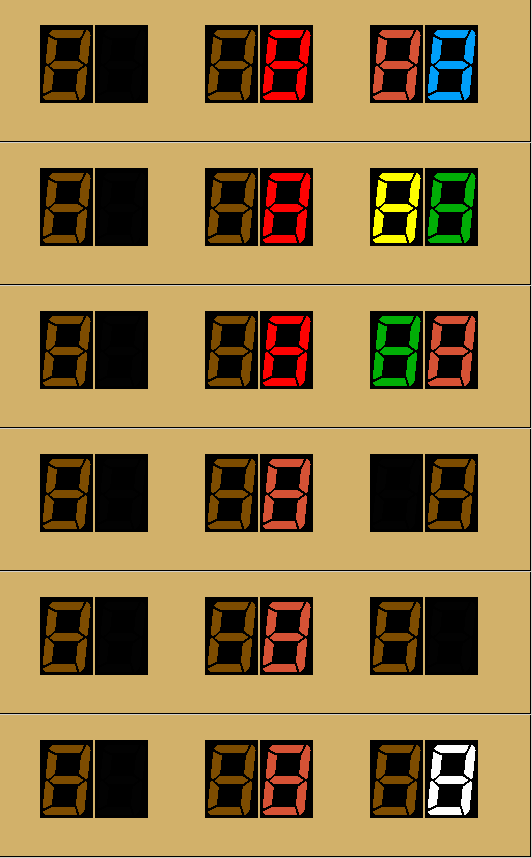
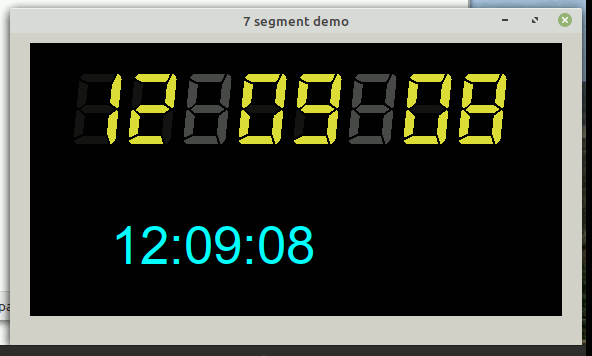
Both of these are still shots or animations of real-time clocks. Reading the colour-coded one is easy only for old-time electronic enthusiasts!
Needs you to save this image as a 24bit BMP..

    nomainwin

    WindowWidth  = 580
    WindowHeight = 200

    graphicbox #w.g1    20, 10, 532, 143

    global hdc, targetcolor, sepn, c$, p

    sepn             =55

    open "7 segment demo" for window as #w

    #w    "trapclose [quit]"

    hw      =hwnd( #w.g1)
    calldll #user32, "GetDC", hw as ulong, hdc as ulong

    loadbmp "scr", "oneDigitO.bmp"
    #w.g1 "down ; fill 210 177 106"

    for d =0 to 7
        if d <>2 and d<>5 then #w.g1 "down ; drawbmp scr "; 40 +d *sepn; " 25"
    next d

    #w.g1 "backcolor "; "220 220 80"
    #w.g1 "color white" '   for debugging x,y positions

    targetcolor     = 0  '   this is the colour of the outline to fill out to.


    x( 1) = 72:     y( 1) = 35    '   coordinates to fill each bar from
    x( 2) = 84:     y( 2) = 48
    x( 3) = 80:     y( 3) = 84
    x( 4) = 64:     y( 4) = 96
    x( 5) = 48:     y( 5) = 83
    x( 6) = 52:     y( 6) = 50
    x( 7) = 68:     y( 7) = 65

    bar$( 0)    ="1111110"
    bar$( 1)    ="0110000"
    bar$( 2)    ="1101101"
    bar$( 3)    ="1111001"
    bar$( 4)    ="0110011"
    bar$( 5)    ="1011011"
    bar$( 6)    ="1011111"
    bar$( 7)    ="1110001"
    bar$( 8)    ="1111111"
    bar$( 9)    ="1111011"

    col$(  0)   ="  2   2   2"
    col$(  1)   ="125  76   0"
    col$(  2)   ="253   2   2"
    col$(  3)   ="214  82  53"
    col$(  4)   ="254 254   0"
    col$(  5)   ="  1 174   6"
    col$(  6)   ="  0 159 249"
    col$(  7)   ="186 120 231"
    col$(  8)   ="152 152 152"
    col$(  9)   ="253 253 253"

    now     =time$( "seconds")
    c       =0

    do
        scan
        calldll #kernel32, "Sleep", 400 as ulong, r as void

        c$   =time$()

        for p =1 to 8
            if mid$( c$, p, 1) <>":" then call displayAsSevenSeg, p, 8    '   character position ( 1 =LHS) and char number to display
        next p

        #w.g1 "getbmp scr2 0 0 532 143"
        bmpsave "scr2", "ccode" +right$( "000" +str$( c), 3) +".bmp"
        c   =c +1

    loop until ( time$( "seconds") -now) >100

    wait

    sub displayAsSevenSeg charNum, displayChar    '   character number ( 1 =LHS) and number to display
        for b =1 to 7
            x   =x( b) +( charNum -1) *sepn
            y   =y( b)
            d$  =bar$( displayChar)

            if mid$( d$, b, 1) ="1" then
                #w.g1 "backcolor "; col$( val( mid$( c$, p, 1)))
            else
                #w.g1 "backcolor 72 72 72"
            end if

            calldll #gdi32, "ExtFloodFill", hdc as ulong, x as long, y as long, targetcolor as long, _FLOODFILLBORDER as long, result as long

            '#w.g1 "set "; x; " "; y  '   for debugging x,y positions
        next b
    end sub

  [quit]
     calldll #user32, "ReleaseDC", hw as ulong, hdc as ulong, ret as void   'release the DC
     close #w
    end
    nomainwin

    WindowWidth  = 580
    WindowHeight = 340

    graphicbox #w.g1    20, 10, 532, 273

    global hdc, targetcolor, sepn

    sepn             =55

    open "7 segment demo" for window as #w

    #w    "trapclose [quit]"

    hw      =hwnd( #w.g1)
    calldll #user32, "GetDC", hw as ulong, hdc as ulong

    loadbmp "scr", "oneDigit.bmp"
    #w.g1 "down ; fill black"

    for d =0 to 7
        #w.g1 "down ; drawbmp scr "; 40 +d *sepn; " 25"
    next d

    #w.g1 "backcolor "; "220 220 80"
    #w.g1 "color white" '   for debugging x,y positions

    targetcolor     = 0  '   this is the colour of the outline to fill out to.


    x( 1) = 72:     y( 1) = 35    '   coordinates to fill each bar from
    x( 2) = 84:     y( 2) = 48
    x( 3) = 80:     y( 3) = 84
    x( 4) = 64:     y( 4) = 96
    x( 5) = 48:     y( 5) = 83
    x( 6) = 52:     y( 6) = 50
    x( 7) = 68:     y( 7) = 65

    bar$( 0)    ="1111110"
    bar$( 1)    ="0110000"
    bar$( 2)    ="1101101"
    bar$( 3)    ="1111001"
    bar$( 4)    ="0110011"
    bar$( 5)    ="1011011"
    bar$( 6)    ="1011111"
    bar$( 7)    ="1110001"
    bar$( 8)    ="1111111"
    bar$( 9)    ="1111011"

    now =time$( "seconds")

    do
        scan
        calldll #kernel32, "Sleep", 200 as ulong, r as void

        c$   =time$()

        for p =1 to 8
            if mid$( c$, p, 1) <>":" then call displayAsSevenSeg, p, val( mid$( c$, p, 1))    '   character position ( 1 =LHS) and char number to display
        next p

        call sevenSegDisplay 80, 220, "cyan", 40, c$

    loop until ( time$( "seconds") -now) >100

    wait

    sub displayAsSevenSeg charNum, displayChar    '   character number ( 1 =LHS) and number to display
        for b =1 to 7
            x   =x( b) +( charNum -1) *sepn
            y   =y( b)
            if mid$( bar$( displayChar), b, 1) ="1" then
                #w.g1 "backcolor 220 220 60"
            else
                #w.g1 "backcolor 20 20 20"
            end if

            calldll #gdi32, "ExtFloodFill", hdc as ulong, x as long, y as long, targetcolor as long, _FLOODFILLBORDER as long, result as long

            '#w.g1 "set "; x; " "; y  '   for debugging x,y positions
        next b
    end sub

    wait

  [quit]
     calldll #user32, "ReleaseDC", hw as ulong, hdc as ulong, ret as void   'release the DC
     close #w
    end

    sub sevenSegDisplay x, y, col$, size,  dispData$
        #w.g1 "up ; goto "; x -70; " "; y -90
        #w.g1 "down ; backcolor black ; color black"
        #w.g1 "boxfilled 500 240"
        #w.g1 "up ; goto "; x; " "; y
        #w.g1 "color "; col$
        #w.g1 "font Digital-7_Italic "; size
        #w.g1 "\" +dispData$
    end sub